Sidebar Enhancements: Dates, Filters & a Sticky Header
See the date on every chat in your ChatGPT sidebar, and narrow the list to a single week or one tag without leaving it. Sidebar Enhancements adds date labels, a date-range filter, and a tag filter right where your chats already live.
It's part of the free ChatGPT Pro Tools extension. A sticky "Recent" header keeps the filters in reach as you scroll, so you can jump to the chats from a specific span of days — or every chat carrying a given tag — without opening the full Chat Workspace.
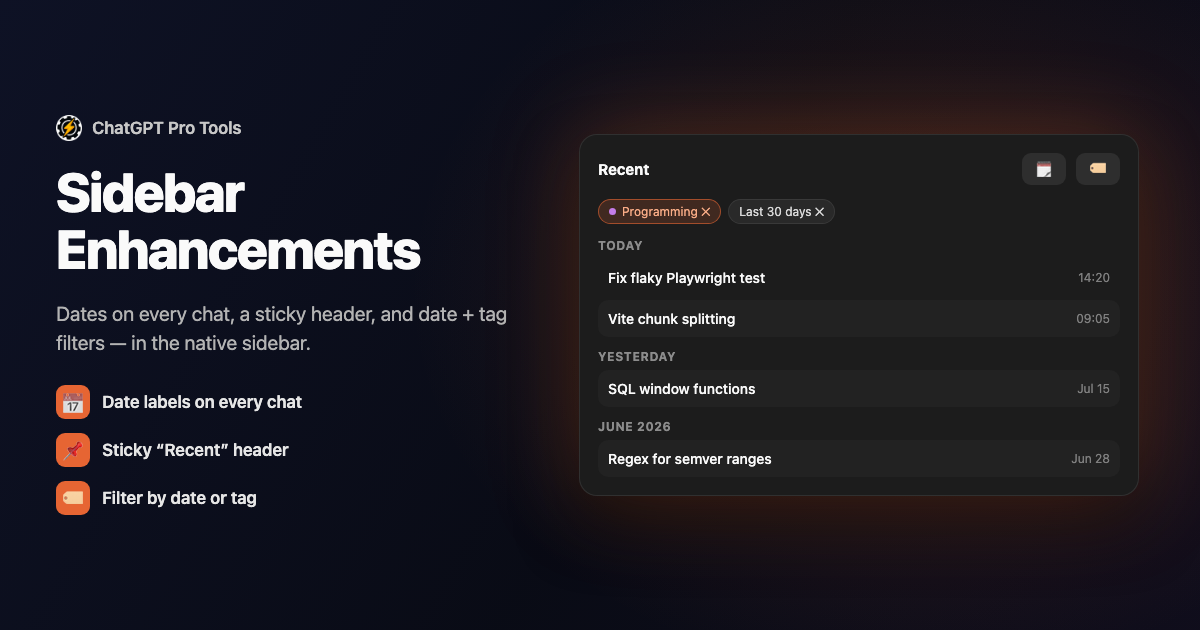
What You Get
- Date labels on every chat — see at a glance when each conversation happened, right in the sidebar
- A date-range filter — narrow the list to a span of days without opening anything else
- A tag filter — show only the chats carrying a given tag, using the tags from AI Tags
- A sticky "Recent" header — the filters stay pinned as you scroll the list
- Free — part of the core extension, with no cap
Why the Native Sidebar Leaves You Scrolling
ChatGPT's sidebar is a flat, undated list. You can't tell whether a chat is from yesterday or last March without opening it, and there's no way to filter — so finding an older conversation means scrolling until you happen to spot the title. Sidebar Enhancements adds the two things that list is missing: dates you can see, and filters you can apply in place. When you need more — search, previews, bulk actions — the Chat Workspace goes further; the sidebar filters are the quick version for a fast narrow-down.
How to Use It
Get it from the Chrome Web Store or Firefox Add-ons. It activates automatically on chatgpt.com.
Date labels appear on your sidebar conversations automatically, so you can see when each chat happened without opening it.
Use the date-range filter and the tag filter in the sticky "Recent" header to narrow the list — to a range of days, to a tag, or both.
Free vs Pro
Sidebar Enhancements is free: date labels, the date-range filter, and the tag filter are all part of the core extension. The tag filter draws on the tags from AI Tags — on the free tier, generating and applying tags runs in the cloud once a month each (or with no limit on your device in Chrome), and the optional Pro tier ($4.99/mo) makes the cloud unlimited. Free to install; the Pro tier is optional.
Frequently Asked Questions
Is Sidebar Enhancements free?
Yes. Date labels, the date-range filter, and the tag filter are all free — part of the core extension. The optional Pro tier ($4.99/mo) adds other tools, but the sidebar features are not gated.
Where do the tags in the tag filter come from?
They're the tags from AI Tags. Once you've generated a tag vocabulary for your chats, the sidebar's tag filter lets you show only the conversations carrying a given tag, without opening the Chat Workspace.
How is this different from the Chat Workspace?
The sidebar filters are the quick, in-place version — date-range and tag filters applied right where your chats already live. The Chat Workspace is the full-screen panel with search, previews, and bulk actions when you need to go further.
Does it change my chats?
No. It only changes how the sidebar displays your existing chats — adding dates and filters. Nothing is renamed, moved, or sent anywhere, and the enhancements run locally in your browser.


